
Giveaway of the Day - Process Lasso 3.8
 September 1, 2010This giveaway is not available any more.
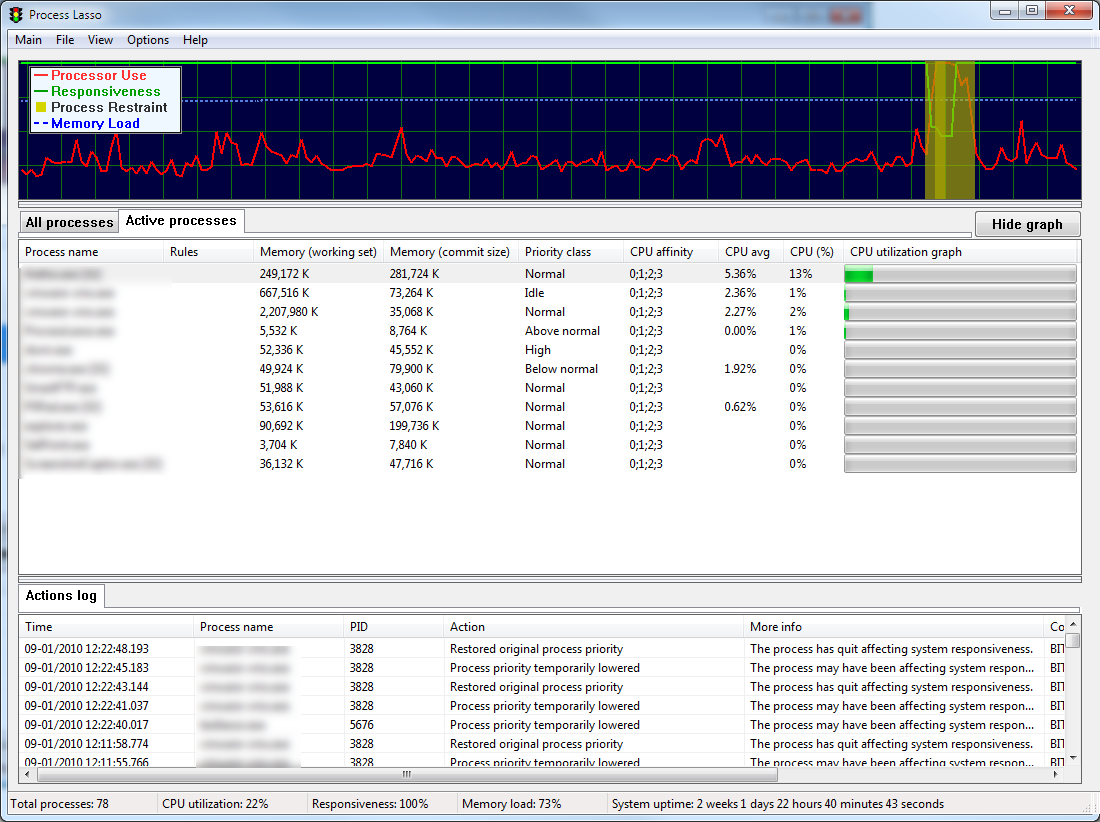
Process Lasso is a unique new technology that will improve your PC’s responsiveness and stability. Windows, by design, allows programs to monopolize your CPU without sufficient restraint – leading to hangs and micro-lags. Process Lasso’s ProBalance (Process Balance) technology intelligently adjusts the priorities of running programs so that badly behaved processes won’t negatively impact the responsiveness of your PC. It does this not by raising process priorities, but instead by temporarily lowering the priorities of background processes that may be interfering with foreground responsiveness.
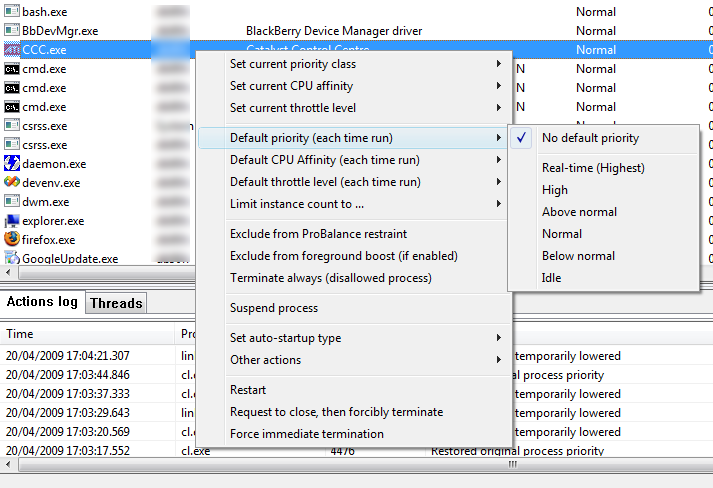
Process Lasso also offers an assortment of ways to take full control of how your CPUs are allocated to running programs. You can choose at what priority processes should run, and which CPUs should be assigned to them. You can also disallow certain programs from running, log all programs run, automatically restart programs, limit the number of instances of a program, and much more. You can even indicate processes that should induce
entrance into the High Performance power scheme or prevent the PC from sleeping. A gaming mode allows for easy process priority optimization for avid gamers.
If you are x64 OS user, please follow the link here (file size: 2.44 MB).
| User Rating: Rate It! | 209 comments |
|---|---|
| System Requirements: | Windows 2000, XP, 2003, 2008, Vista, and 7 |
| Publisher: | Bitsum Technologies |
| Homepage: | http://www.bitsum.com/ |
| File Size: | 2.35 MB |
| Price: | $24.95 |
This software was available as a giveaway on September 1, 2010, this giveaway is not available any more.
You can download the trial version of this software at http://www.bitsum.com/.
Terms and conditions
Please note that the software you download and install during the Giveaway period comes with the following important limitations:
1) No free technical support; 2) No free upgrades to future versions; 3) Strictly personal usage.
THIS SOFTWARE PRODUCT IS PROVIDED "AS IS" WITHOUT ANY WARRANTY OF ANY KIND, EITHER EXPRESS OR IMPLIED. WITHOUT LIMITATION, TO THE FULLEST EXTENT ALLOWABLE BY LAW, END USER ASSUMES THE ENTIRE RISK AS TO THE QUALITY AND PERFORMANCE OF THE DOWNLOADED SOFTWARE PRODUCT.
Share your ideas

Screenshots
-
Subscribe by Email
Powered by FeedBurner - RSS Feed
- RSS Comments Feed
-
 Retransmit our giveaways to your twitter friends
Retweet latest giveaway tweets automatically to become an even better friend.
-
 Add our application to your Facebook page and it will remind you and your friends about a new giveaway on a daily basis.


 Idea's Geek'o'meter
| 1 | Colin Wiffen | 1459 |
| 2 | BuBBy | 759 |
| 3 | kazi | 537 |
| 4 | Michael | 410 |
| 5 | Chakotay | 348 |
| 6 | Hector | 343 |
| 7 | Terry Barrett | 299 |
| 8 | Laurel | 252 |
| 9 | hlm | 245 |
| 10 | Barry1214 | 224 |

| M | T | W | T | F | S | S |
|---|---|---|---|---|---|---|
| « Apr | ||||||
| 1 | 2 | 3 | 4 | 5 | 6 | |
| 7 | 8 | 9 | 10 | 11 | 12 | 13 |
| 14 | 15 | 16 | 17 | 18 | 19 | 20 |
| 21 | 22 | 23 | 24 | 25 | 26 | 27 |
| 28 | 29 | 30 | 31 | |||


First, I would like to thank all Giveaway of the Day users for our positive give-away last time. Your community is friendly, and I greatly appreciated feedback I was given. I wanted to express a few things to the community — to introduce myself to new users, correct misunderstandings, and provide other context.
Process Lasso is NOT a simple task manager, it is a an automation utility to automate various operations on running processes.
I am single developer operating a small sole proprietorship. I develop my software because I am passionate about it, and sell to pay my bills. If I could, I’d do it all free (and often do). I use my own software every single day.
Process Lasso’s ProBalance algorithm dynamically lowers the priority of select background processes at appropriate times to improve responsiveness. It can be demonstrated by our CPUEater application or your own while(1) loop ;). While the Windows CPU Scheduler does a decent job, it tries too hard to be fair at times. We also have research material, and information about how a single thread at normal priority can surprisingly bring a single CPU system to its knees in a while(1) loop.
Process Lasso logs every action it takes on other processes.
Process Lasso can be used to automate process management. It is like an easy to program robot that efficiently executes your ‘instructions’. It is better than a script language in that the native code is highly efficient, where-as interpreted scripts are slow. Naturally, the trade off is a little less robustness.
Process Lasso is NOT a magic elixir that can solve any PC problem you have. Process Lasso makes no tweaks to your registry, or anything like that.
Process Lasso includes no adware, no toolbars, or other bundled ‘stuff’.
Version 4 is set to go final within a couple weeks now, I’m working my butt off. The change is huge and even more work remains.
As an engineer my focus does tend to be mostly on the ‘guts’ of the software, rather than the aesthetics — sometimes to my detriment.
The Good
* Has the ability to intelligently manage CPU priorities for individual processes – allowing users to work unhindered – based on the current system conditions (“ProBalance” mode).
o Users are allowed to customize the parameters of “ProBalance”.
o Users are allowed to exclude specific processes from being managed via “ProBalance”.
* Has a “Gaming Mode” which allows users to run full-screen games/processes without worry of interference from Process Lasso.
o Users can define specific processes which automatically trigger “Gaming Mode” when detected.
* Allows users to manually change CPU priorities, affinities, and/or throttle the CPU for all individual processes.
o Users can set default CPU priorities, affinities, and/or throttles for specific processes.
* Allows users to blacklist specific processes which are automatically terminated when detected.
* Allows users to limit the amount of instances for specific processes and specify specific processes to always run.
* Has the ability to prevent the computer from timing out/sleeping when specific processes are running and the ability to automatically change the PC to “High Performance” when specific processes are detected (if applicable).
* Can manage current user’s processes, and/or all users’ processes.
* Users have the option to run the core engine without the GUI (management console), to make Process Lasso more efficient.
* Core engine can be run as a service.
The Bad
* The management console has a very “techie” look and feel to it. So, Process Lasso needs some sort of “Non-techie console” that allows users to just run Process Lasso and let it do its thing without having to worry about all the settings available in the management console. This “Easy Mode” should only have a few basic settings such as being able to switch between “ProBalance” and “Gaming Mode” to avoid scaring the average user.
Free Alternatives
Process Tamer
For final verdict and recommendations, please click here.
Darn, I lost some formatting in my last comment. The preview looked good, but the post didn’t. I apologize, and please find the same text here (along with download and licensing info):
http://www.bitsum.com/pl_gotd.php
IMPORTANTLY, I am also offering for free the latest v4 beta (v3.99.17 beta) for those who are adventurous. You can downgrade at any time to v3.84.7 (the last final).